
15) Thank you Page
At this point, the enrollment is already complete and the Thank you page will show the following information:
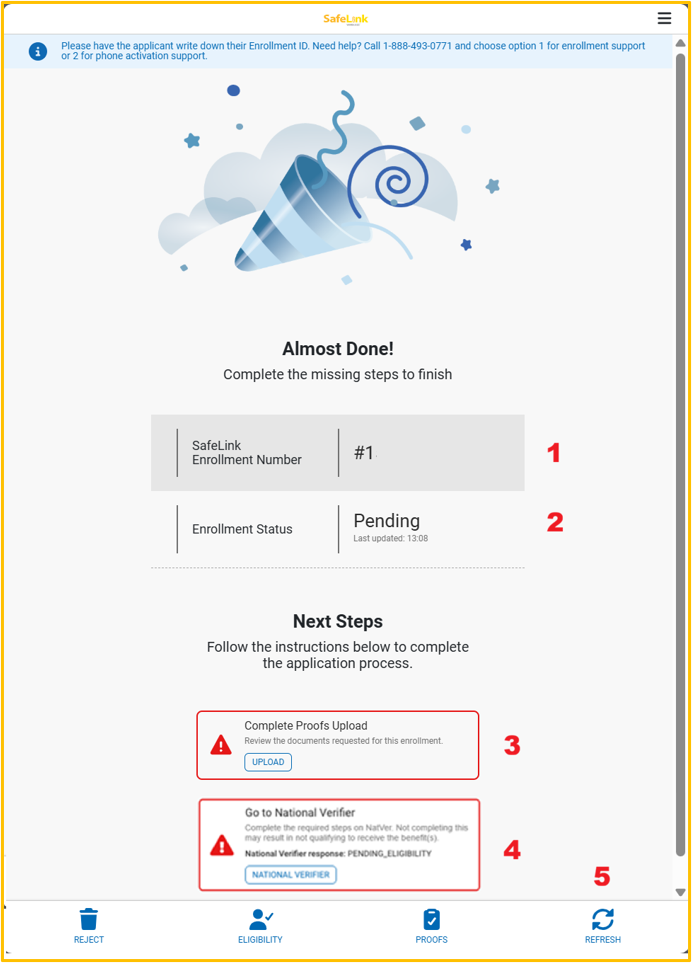
1 Enrollment number: It should always be provided to the applicant, so that they can follow up on the application status or any other service assistance requirements that the applicant might need in the future.
2 Enrollment status: An application can have differentstatuses. The defaultstatus after being created is Pending. Other statuses are:
Qualified: (all documents were processed and classified as valid).
Rejected: (proof and application have been rejecteddue to mismatching data, or as per customer/Street Team Agent request).
3 Proofs Status: this section provides instructions for the Street Team Agent to know how to proceed during the proof review process.
4 Go to National Verifier button: if applicants have missing steps on NatVer’s side, they should select this option, so that they can be referred to the NatVer website and provide the required data.
5 Refresh Button: tap on this button in order to refresh the status and see if any changes applied during the post enrollment process.