Financial Assistance Available
This article details the procedures that callcenter agents should follow to assist customers who applied for the Lifeline discount using a different retailer than Safelink. From now on, customers will be able to apply through a different retailer (also known as a cobrand), receive the cell phone and the service from them and get the Lifeline discount from Safelink.
Since the information and the procedures related to their account information will be different from those of regular customers, we will review the correct processes that must be followed when providing assistance to cobrand customers.
Basic information
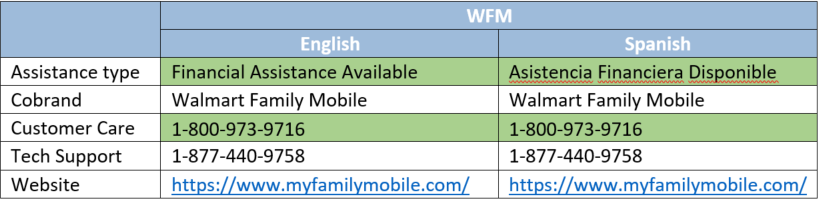
Cobrands: they provide cell phones and cell phone service. Usually, the service provided is for prepaid phones. In our internal jargon, cobrands are also known as Financial Assistance Available.
Financial Assistance Available: this term will also be used when agents open the call. Basically, instead of stating “Thank you for calling Safelink Wireless”, they will have to state “Thank you for calling Financial Assistance Available”.
Wallmart Family Mobile: momentarily, it is the only cobrand that will be operating.
Flags: There will be a new flag available in cobrand enrollments, so that agents can identify that the account belongs to one of these customers.
The first part of the flag (BRAND) will always remain the same, while the second part will vary depending on the cobrand implicated. In this case, the WFM stands for Wallmart Family Mobile, which is the only active cobrand so far.
Account creation and review
Agents will be able to review the information from these enrollments, such as:
- Account status: the information will be displayed as usual. There will not be new statuses for these enrollments.
- Proofs: the proofs that customers must submit are also the same, so the backoffice process does not vary. Every now and then, a Financial Assistance Available form may show upwhich should be uploaded as a regular application form, selecting the Application option in the tool.
- Plan selected: the plans that these customers will get are different from the SafeLink ones. The plans will vary according to the cobrand. Agents only need to take a look at the Plan section from the enrollment and provided the information displayed, in case the customer is interested in knowing this information.
If customers state that they have issues with their plan, agents should not provide information on that matter. They will have to inform customers that to get further information about their plan, they can contact the Cobrand’s Customer Care department. There will also be a contact number available for issues related to Technical Support. The contact numbers are available at the Contact information section.
- Edit information: as usual, agents will be able to edit the customer’s address and the contact information. The PII will not be editable. Once again, if the customer wants to edit their plan, agents have to refer them to the Cobrand’s Customer Care department. The contact information is listed below.
Contact information